Green Decorative Alphabet Set: A Designer's Playful Toolkit
More Than Just Letters: Understanding the Set's Character
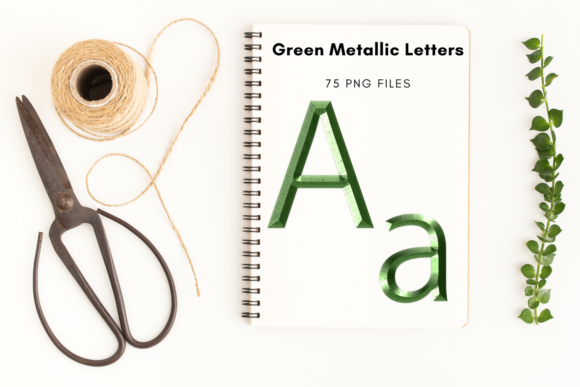
Let's get straight to it. The Green Decorative Alphabet Set isn't a traditional typeface you install and type with. Think of it as a collection of high-quality, pre-designed graphic elements. Each of the 75 pieces—uppercase letters, lowercase letters, numbers, and symbols—is a standalone PNG file with a transparent background. The real magic is in the texture: a shiny, metallic green finish that feels both retro and luxurious. It's the kind of detail that adds instant depth and personality to a project without requiring advanced design skills. The approximate 5x5 inch size at 300 dpi means these assets are built for serious print and digital work, giving you crisp results whether you're making a small social media icon or a large poster.
Where This Alphabet Set Truly Shines
This is where practical application meets creative flair. Because each letter is a separate, high-quality image, the uses are surprisingly versatile. It’s a fantastic tool for anyone who needs to create standout text without relying on standard fonts.
- Invitations & Stationery: This is a natural fit. Imagine a baby shower or birthday invitation where the guest of honor's name is spelled out in these vibrant, textured letters. It instantly elevates the design from a simple template to something custom and memorable. Wedding menus, thank you cards, and personalized stationery also benefit from this touch of elegance.
- Branding & Marketing: For small business owners, this set can be a secret weapon. Use individual letters to create a distinctive monogram for a logo, highlight a key word on a website banner, or design eye-catching social media graphics that stop the scroll. The retro metallic style works particularly well for brands in the beauty, boutique, or artisanal food space.
- Digital & Editorial Design: Bloggers and content creators can use these letters to craft unique chapter headings, pull quotes, or featured image text. In web design, a well-placed decorative letter can serve as a powerful visual anchor. The transparent background makes layering over photos or colored sections seamless in editors like Canva or PicMonkey.
- Crafting & Print-on-Demand: For crafters, the possibilities are endless. Print and cut them out for scrapbooking, card making, or party decorations. If you use a service like Canva for print-on-demand products, you could incorporate these letters into designs for notebooks, posters, or apparel, provided you adhere to the commercial license terms.
Making the Most of Your Design Assets
Using a decorative element set like this effectively is about more than just spelling words. It’s about integrating it into your broader design strategy. Here’s how to approach it with a professional mindset.
Evaluate the Project Fit. First, does the font's personality align with your message? The shiny, metallic, retro style conveys playfulness, nostalgia, and a certain boldness. It's perfect for celebratory, creative, or youthful projects. It might not be the best choice for a formal legal document or a minimalist tech startup's primary branding, but it could be a fantastic accent.
Consider Readability and Hierarchy. Because these are display-style elements, they are best used for headlines, titles, or short phrases—not body text. Use them to create a strong visual hierarchy. Pair a word made from the Green Decorative Alphabet Set with a clean, simple sans serif font for supporting text. This contrast ensures your message is both eye-catching and easy to read.
Test Your Pairings. Don't just guess. Create a simple test layout. Place your decorative headline next to your chosen body font. Does it feel balanced? The bold texture of these letters pairs well with understated typefaces. A simple geometric sans serif or a classic serif font can provide a perfect, readable counterpoint without competing for attention.
Understand the Asset Structure. Remember, you're working with individual image files, not a font file. This means you have ultimate control over placement, size, and rotation for each letter. However, it also means you need software that can handle PNG imports and layer management. Programs like Adobe Photoshop, Illustrator, Affinity Designer, or even Canva Pro are ideal. Check that your workflow supports this asset-based approach.
Review the License. Since this is a digital design asset, the licensing is crucial. The listing states it's for digital files only. Before using the Green Decorative Alphabet Set in any commercial project—like selling products on Etsy or incorporating it into a client's logo—review the specific terms of the license you purchased. Understanding what is and isn't permitted protects you and respects the creator's work.
Ultimately, a resource like this is about expanding your creative toolkit. It provides a shortcut to a specific aesthetic—polished, playful, and retro—that might otherwise take hours to achieve manually. By thinking strategically about its application, you can use these design assets to add a layer of professionalism and unique character to your work, making your projects more engaging and visually cohesive.